Your Company Deck
Each player needs their own Company Deck.
Your Company Deck contains your Hire, Mayhem, and Fix cards. These are the cards you will draw from and use throughout the game.


How to Play / Rules Version 1.0
Run your staffing agency. Complete Jobs. Reach the winning Profit total before anyone else.
2–4 PLAYERS 10 OR 20 PROFIT
01 / Welcome
You run a staffing agency with one simple goal: make a profit.
Your staff may include ghosts, vampires, monsters, strange creatures, and other supernatural hires who are somehow expected to do regular jobs. Some are perfect for the work. Some are barely qualified. Some should probably never have been hired in the first place.
During the game, you will send your Hires out to complete Jobs and earn Profit. The right Qualification can make a Job easier, while the wrong team can turn a normal workday into a complete disaster.
You can also use Mayhem cards to cause problems for your opponents and Fix cards to help clean up your own messes.
Extremely Bad Hires is a competitive card game for 2-4 players. Your goal is to manage your staffing agency, complete Jobs, deal with trouble, and reach the winning Profit total before anyone else.
Choose which game you want to play before setup begins.
Finish resolving the current card, Job, or effect before checking for a winner. See Winning the Game.
02 / Before you begin
Each player needs their own Company Deck.
Your Company Deck contains your Hire, Mayhem, and Fix cards. These are the cards you will draw from and use throughout the game.
All players share one Job Deck.
Jobs are the assignments your staffing agencies compete to complete in order to earn Profit.
Each player needs a way to keep track of their current Profit and any Incapacitated Hires.
Official Player Trackers make this easy, but they are not required to play. You may use paper, counters, dice, tokens, or any other clear method that works for your group.
If you are using an official Player Tracker, use the reusable markers included with it to record your Profit and Incapacitated Hires.
This guide teaches setup and core play. The Rules Reference is the destination for detailed timing and unusual situations.
03 / Your staffing toolkit
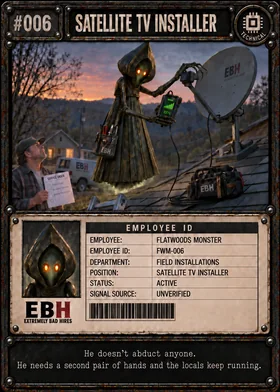
Flatwoods Monster
Hires are the employees who make up your staffing agency.
Each Hire has a Qualification that shows the kind of work they are best suited for. Once a Hire joins your staff, they can be sent out to help complete Jobs.
Hire cards also show employee information such as the Hire's role, department, status, and other dossier details.
Your Hires will usually stay with your agency until something happens to them.
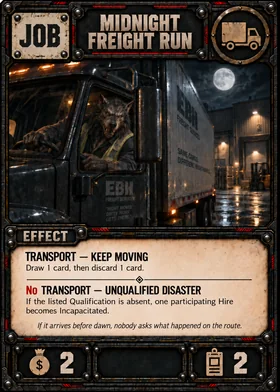
Midnight Freight Run
Jobs are the assignments your staffing agency is trying to complete.
All players use the same shared Job Deck.
Each Job shows:
How much Profit it is worth
How many Hires are required
A Qualification that may change how the Job plays
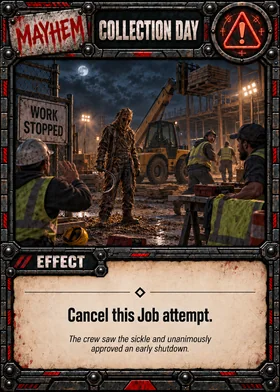
Collection Day
Mayhem cards are used to cause trouble.
They can interfere with Hires, Jobs, opponents, or other parts of the game depending on the effect written on the card.
When you play a Mayhem card, follow its effect and resolve what happens before continuing play.
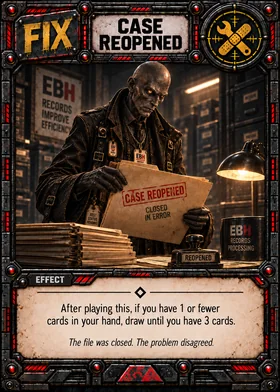
Case Reopened
Fix cards help you deal with problems when things start falling apart.
They may help your Hires recover, replace lost resources, undo damage, or give you another way to get your agency back on track.
Like Mayhem cards, each Fix card tells you exactly what it does.
04 / Know your staff
Every Hire has a Qualification.
A Qualification shows the kind of work that Hire is best suited for. Jobs also use Qualification icons to show when a certain type of Hire may help - or when not having one may cause trouble.
The same Qualification icon always means the same thing wherever it appears.

For fixing, maintaining, inspecting, or working with equipment and structures.

For cooking, serving, preparing, or handling food.

For driving, delivery, moving people, moving goods, and transportation work.

For health care, treatment, medical work, and patient-related Jobs.

For computers, electronics, technology, systems, and technical work.

For communication, sales, customer service, public relations, and dealing with people.

For guarding, protection, loss prevention, access control, and keeping things secure.

For teaching, research, education, and knowledge-based work.

For contracts, disputes, legal matters, and rules somebody probably should have read first.

For paranormal, ritual, supernatural, and other work HR refuses to explain.

For rescue, wilderness work, emergency response, and dangerous conditions.

For management, records, coordination, supervision, and keeping the workplace running.
You do not need to memorize every Qualification before playing.
Keep this page nearby and check it whenever you need it.
05 / Open your agency
Before setting up, decide which Profit goal you are playing to:
Quick Game - 10 Profit
Standard Game - 20 Profit
Everyone uses the same Profit goal for that game.
Each player takes their own Company Deck and shuffles it.
Place your deck face-down in front of you with enough room nearby for:
Your Active Hires
Your discard pile
Any Incapacitated Hires
Each player draws 5 cards from their Company Deck.
Keep your hand hidden from the other players.
Remember: your maximum hand size is 7 cards.
No Hires begin in play unless a card or rule specifically says otherwise.
Shuffle the shared Job Deck and place it face-down where everyone can reach it.
Reveal the top Job and place it face-up in the center of the table.
This is the Active Job.
Only one Job is Active at a time unless a card or future rule specifically says otherwise.
Every player begins the game with 0 Profit.
If you are not using a Player Tracker, use any clear method that lets everyone see your current Profit.
Leave room near your play area for any Hires that become Incapacitated during the game.
If you are using a Player Tracker, you can record them there.
If not, use a clear method to show which Hire is Incapacitated and how many turns remain.
Choose the first player at random, or use any fair method your group agrees on.
Play then continues around the table in order.
06 / One turn at a time
Players take turns one at a time.
On your turn, follow these steps in order:
Any Hires you played on your previous turn become Active.
Active Hires are ready to participate in Jobs.
Then draw 1 card from your Company Deck.
During your Preparation Window, you may play up to 2 Hire cards from your hand.
New Hires enter your staff Inactive. They cannot participate in a Job on the same turn they are played.
At the start of your next turn, they become Active.
You may also play your 1 Fix card for the turn during this window.
You may play your Hires and your Fix in whatever order makes sense.
Your staffing agency may have no more than 6 Hires at one time.
Active, Inactive, and Incapacitated Hires all count toward this limit.
You may attempt the Active Job once during your turn.
Choose which of your Active Hires you are sending to the Job.
The Hires you choose become the participating Hires.
Check the Qualification shown on the Job and determine whether the Qualification or No Qualification effect applies.
Apply any effect that changes the number of Required Hires.
Your participating crew must meet the final Required Hires amount.
Once the crew and Job effect have been determined, the crew is Clocked In.
If you cannot or do not want to attempt the Active Job, you may skip it and move to your Recovery Window.
After your crew is Clocked In, opponents get their chance to play Mayhem.
Starting with the opponent to your left, each opponent may play 1 Mayhem card or pass.
Each opponent gets only one chance during that Job attempt.
Once the crew is Clocked In, Mayhem does not change which Qualification or No Qualification effect was already chosen.
After every opponent has either played their one Mayhem card or passed, and before the Job resolves, check whether the participating crew still meets the Job's current Required Hires amount.
Apply any Mayhem changes to Required Hires or to whether a participating Hire counts. A Hire that was returned, removed from participation, or Incapacitated does not count toward this check.
If the remaining crew meets or exceeds the current Required Hires amount, continue to Job resolution. If it does not, the Job attempt ends without completion: the player does not gain the Job's printed completion Profit, the Active Job remains in place, and play continues to the Recovery Window.
Do not recalculate the Qualification or No Qualification path. That decision remains locked from Clock In. The Active player may not add replacement Hires after Clock In to satisfy this check.
Follow the Job and any Mayhem effects that apply.
After the Job is fully resolved, gain or lose Profit as instructed.
If the Job is completed, place it in the Job discard pile and reveal the next card from the Job Deck as the new Active Job.
Participating Hires are not discarded after completing a Job. They return to your staff and remain Active unless something happened to them during the Job.
If you did not already play a Fix during your Preparation Window, you may play 1 Fix card now.
If you skipped the Active Job, you still get a Recovery Window.
You may never play more than 1 Fix during your entire turn.
Resolve anything that specifically happens at the end of your turn.
Reduce any timed Incapacitation that is due to count down.
If you have more than 7 cards, choose and discard cards until you have exactly 7.
You cannot freely discard cards at other times unless a card effect or another rule tells you to.
Once everything is settled, your turn ends and play passes to the next player.
07 / The assignment
There is normally one Active Job face-up in the center of the table. On your turn, you may attempt that Job once.
You are never required to take a Job just because it is there.
Choose which of your Active Hires you want to send.
Inactive and Incapacitated Hires cannot participate in Jobs.
You may send more Hires than required unless the Job or another card says otherwise.
You do not need the Qualification shown on a Job to attempt or complete it.
The Qualification decides which effect happens.
If at least one participating Hire has the Qualification shown on the Job, use the Job's Qualification effect.
Having more than one Hire with the matching Qualification does not give you the effect more than once unless the card specifically says otherwise.
If none of the participating Hires have that Qualification, use the No Qualification effect instead.
If that effect changes the number of Required Hires, apply that change now.
Your participating crew must meet the Job's final Required Hires amount. If it does not, you cannot attempt the Job with that crew.
Once the crew is Clocked In, the chosen effect stays locked. Resolve the Mayhem Window and staffing check before resolving the Job.
If a card tells you to choose a participating Hire, the choice must come from the Hires assigned to that Job.
Once all Job effects have been resolved, the Job is completed.
Gain the Profit shown on the Job, along with any Profit gained or lost because of its effect or another card.
Apply all Profit gains and losses from that Job together, then update your Profit total.
Your Profit can never fall below 0. If the final result would put you below 0 Profit, remain at 0 instead.
Participating Hires return to your staff after the Job is completed.
Any Hire that became Incapacitated remains part of your staff but is handled under the Incapacitation rules.
Place the completed Job in the Job discard pile.
Then reveal the top card of the Job Deck and place it face-up as the new Active Job.
If you cannot or do not want to attempt the Active Job, leave it face-up.
It remains the Active Job for the next player.
08 / Manage your staff
A newly played Hire enters your staff Inactive.
Inactive Hires are part of your staff, but they cannot participate in Jobs.
At the start of your next turn, they become Active.
Active Hires are ready to work.
They may participate in Jobs and remain Active after a Job unless a card or game effect changes their status.
Participating in a Job does not discard, exhaust, or remove a Hire from your staff.
An Incapacitated Hire is still part of your staff but cannot participate in Jobs.
Incapacitated Hires still count toward your 6-Hire staff limit.
See recovery conditionsEvery Hire has one Qualification.
You only need one participating Hire with the Job's matching Qualification to receive its Qualification effect unless the card says otherwise.
Having two or more matching Hires does not repeat the effect.
A Hire without the matching Qualification can still participate in the Job and still counts toward the number of Required Hires.
Your staffing agency may have no more than 6 Hires at one time.
Active, Inactive, and Incapacitated Hires all count toward that limit.
If your staff is full and you want to bring in a new Hire, you may dismiss 1 Active Hire to make room.
Place the dismissed Hire in your discard pile, then play the new Hire Inactive as normal.
You cannot dismiss an Inactive or Incapacitated Hire to make room.
The new Hire still counts toward your limit of up to 2 Hires played that turn.
09 / Workplace interference
Mayhem cards are how you make somebody else's workday worse.
Most Mayhem is played while another player is attempting a Job. The card tells you exactly what it changes, who it affects, and what unfortunate thing happens next.
When a player attempts a Job, they first choose their participating Hires and check the Job's Qualification.
Once the Qualification or No Qualification effect has been determined, that crew is Clocked In.
Opponents may then play Mayhem against that Job attempt before the Job resolves.
Starting with the opponent to the Active player's left, each opponent gets one chance to either play 1 Mayhem card or pass.
Continue around the table in turn order until every opponent has had their chance.
If an opponent passes, they cannot come back and play Mayhem later during that same Job attempt.
If a Mayhem card ends the Job attempt, the Mayhem Window ends immediately.
Each opponent may play no more than 1 Mayhem card during a single Job attempt.
In a 2-player game, that means a Job can normally face no more than 1 Mayhem card.
In a 3-player game, it can normally face no more than 2.
In a 4-player game, it can normally face no more than 3.
If a Mayhem card tells the player attempting the Job to make a choice, that player makes the choice.
If it tells you to choose a Hire, you must choose a Hire that is a legal target for that card.
Mayhem does only what the card says.
A Mayhem card may target a participating Hire who has the matching Qualification for that Job unless a card or Job effect specifically protects that Hire.
If that Hire is removed, returned, or Incapacitated after Clock In, the Job still uses the Qualification or No Qualification effect that was already chosen.
The Job does not check the crew's Qualifications again.
After every opponent has either played their one Mayhem card or passed, and before the Job resolves, check whether the participating crew still meets the Job's current Required Hires amount.
Apply any Mayhem changes to Required Hires or to whether a participating Hire counts. A Hire that was returned, removed from participation, or Incapacitated does not count toward this check.
If the remaining crew meets or exceeds the current Required Hires amount, continue to Job resolution. If it does not, the Job attempt ends without completion: the player does not gain the Job's printed completion Profit, the Active Job remains in place, and play continues to the Recovery Window.
Do not recalculate the Qualification or No Qualification path. That decision remains locked from Clock In. The Active player may not add replacement Hires after Clock In to satisfy this check.
If an effect says the next Mayhem played against a participating crew is canceled, the entire Mayhem card is canceled.
Has no effect
Does not remove or change any Hire
Cannot remove the Qualification that protected the crew
Is placed in the Mayhem player's discard pile
The player does not gain the Job's printed completion Profit. Any other Profit changes already caused by resolved effects still apply.
The Active Job is not discarded.
The same Job remains available for the next player.
Only that attempt ends. The Job itself does not disappear.
If a Hire is returned to its owner's hand, it is no longer part of that player's staff. If it is played again later, it enters the staff Inactive as normal.
10 / Repair the damage
Fix cards are what you use when your staffing agency needs help getting back on its feet.
They can help recover Hires, reduce Incapacitation, replace cards in your hand, find new resources, or solve other problems that have gotten slightly out of control.
You may play no more than 1 Fix card during your entire turn.
After you draw at the start of your turn and before you attempt a Job.
During this window, you may play your Hires and your Fix in whatever order makes sense.
After your Job attempt is completely finished.
If you have not already played a Fix that turn, you may play one now.
If you skip the Job, you still get a Recovery Window before ending your turn.
If you play a Fix during one window, you cannot play another Fix during the other.
You may only play a Fix if you can make every required choice and pay every required cost shown on the card.
Fix cards do not stay in play after they are used.
A Fix cannot interrupt:
A card may specifically say otherwise.
Playing a Fix does not open a Mayhem Window.
Some Fix cards help Incapacitated Hires.
A Fix may reduce the number of turns a Hire remains Incapacitated or may help a Hire recover in another way.
If a Hire's Incapacitation was caused by an effect that says a Fix is required, that Hire does not recover normally. You must use a Fix that can legally help that Hire.
Follow the instructions on the Fix card exactly.
If a Fix causes you to have more than 7 cards in your hand, you do not have to discard immediately. Check your hand size at the normal end-of-turn step and discard down to 7 then.
11 / Out of action
When a Hire becomes Incapacitated, they are still part of your staffing agency, but they are temporarily unable to work.
Keep the Hire in your staff area and clearly mark that they are Incapacitated.
If you are using an official Player Tracker, record the Hire and any remaining Incapacitation time.
If an effect simply says a Hire becomes Incapacitated and gives no duration or special recovery condition, that Hire is Incapacitated for 1 turn.
If the card gives a different duration or recovery condition, follow the card instead.
The turn in which the Hire becomes Incapacitated does not count.
The Hire must miss the listed number of that player's future turns.
At the end of each of those turns, reduce the Hire's remaining Incapacitation by 1.
When the remaining number reaches 0, the Hire becomes Active again.
If one of your Hires becomes Incapacitated during another player's turn, your next turn is the first turn they miss.
The countdown happens at the end of your turns, not somebody else's.
A Hire becomes Incapacitated for 1 turn.
On that player's next turn, the Hire cannot participate in a Job.
At the end of that turn, reduce the remaining time from 1 to 0.
The Hire becomes Active and is ready to work again on the following turn.
A Hire becomes Incapacitated for 2 turns.
The Hire cannot work during that player's next two turns.
At the end of the first missed turn, reduce the counter from 2 to 1.
At the end of the second missed turn, reduce it from 1 to 0.
The Hire then becomes Active again.
Some Job and Fix effects can recover an Incapacitated Hire or reduce the number of turns remaining.
If an effect says to recover an Incapacitated Hire, that Hire immediately becomes Active, unless the effect that caused the Incapacitation says it cannot recover that way.
If an effect reduces a Hire's remaining Incapacitation to 0, that Hire immediately becomes Active.
If this happens during your Preparation Window, the recovered Hire may participate in a Job later that same turn.
If a Hire recovers while a Job is already being resolved, it becomes Active but does not join the Job already in progress.
If a card says a Hire is Incapacitated until the end of your next turn, that Hire remains Incapacitated for that entire turn.
The Hire becomes Active when the turn ends.
Some effects do not use a turn counter at all.
For example, Floodwater Evacuation can cause two participating Hires to remain Incapacitated until you play a Fix.
Those Hires do not recover through the normal countdown.
When you successfully play and finish resolving any Fix card, the condition is met and those Hires become Active.
If several Hires are waiting on the same until you play a Fix condition, they all recover when that condition is met unless the card says otherwise.
Some stronger effects may say that a Hire becomes Incapacitated indefinitely and that a Fix must be used to recover that Hire.
A recovery-type Fix is a Fix that would normally recover an Incapacitated Hire or reduce Incapacitation by 1 turn or more.
Because an indefinitely Incapacitated Hire has no turn counter to reduce, a legal recovery-type Fix used on that Hire recovers the Hire completely instead.
This is different from until you play a Fix.
For until you play a Fix, any successfully played Fix satisfies the condition.
For an indefinitely Incapacitated Hire, the Fix must actually be able to help that Hire and must legally target it.
You may use the official Player Tracker, dice, counters, paper, or another clear method to track Incapacitation.
For timed Incapacitation, record the remaining turns.
For a Hire waiting until any Fix is played, mark it clearly as FIX.
For an indefinitely Incapacitated Hire that must be recovered by a recovery-type Fix, use a different clear mark so everyone knows the Hire does not recover normally.
12 / Make a Profit
Reach the chosen Profit goal before everyone else.
Quick Game - 10 Profit
Standard Game - 20 Profit
You do not need to land on the exact number.
If the goal is 20 Profit and you reach 21, 22, or more, you still win.
Do not check for a winner in the middle of resolving a card, Job, or other effect.
Finish resolving the current effect completely, including every Profit gain or loss.
After everything from that effect has been settled, check your Profit total.
If your Profit is equal to or greater than the chosen winning total, you win the game immediately.
Any game effect that legally raises your Profit to the winning total can win the game. It does not have to come directly from the Profit printed on a Job.
If your Profit reaches the winning total during an effect but falls back below it before that effect finishes, you have not won.
Standard Game example
18 + 4 − 1 = 21 ProfitYou are playing a Standard Game and currently have 18 Profit.
You complete a Job worth 4 Profit, but its effect causes you to lose 1 Profit.
You have reached the 20-Profit goal and win the game.
Remember that your Profit can never fall below 0.
Apply all Profit gains and losses from an effect together before updating your total.
You do not need to finish the round after someone reaches the winning Profit total.
Once a player has fully resolved the effect that leaves them at or above the goal, the game ends.
13 / Put it together
For this example, the Active Job is Backcountry Recovery.
Survival - Trail Marked: Draw 1 card.
No Survival - Gear Confiscated: Discard 1 random card from your hand.
Your staff already includes Bigfoot - Search & Rescue Specialist, who has the Survival Qualification, and Old Rattlefog - Paranormal Investigator, who has the Occult Qualification.
Both Hires are Active.
Any Hires you played on your previous turn become Active.
Draw 1 card from your Company Deck.
You may now play up to 2 new Hires from your hand.
Any new Hires enter your staff Inactive and cannot work this turn.
You may also play your 1 Fix card for the turn during this window if you need one.
For this example, you do not need a Fix.
You decide to take on Backcountry Recovery.
It requires 2 Hires, so you send:
You have enough Hires to meet the Job requirement.
At least one participating Hire has the listed Survival Qualification, so the Job will use:
Your crew is now Clocked In.
Starting with the opponent to your left, each opponent may play up to 1 Mayhem card or pass.
For this example, everyone passes.
Because Bigfoot has Survival, resolve Trail Marked: draw 1 card.
Then complete the Job and gain its printed 2 Profit.
Your participating Hires return to your staff and remain Active.
Place Backcountry Recovery in the Job discard pile and reveal the next Job.
That card becomes the new Active Job.
If you did not use a Fix during your Preparation Window, you may play your 1 Fix for the turn now.
For this example, you keep it for later.
Resolve anything that happens at the end of your turn.
Then check your hand.
If you have more than 7 cards, discard cards of your choice until you have 7.
Your turn is finished and play passes to the next player.
Suppose you attempted Backcountry Recovery with Old Rattlefog and another Hire who also did not have the Survival Qualification.
You would still have the 2 Hires required to attempt the Job.
But because neither participating Hire has Survival, you would use:
No Survival — Gear Confiscated: discard 1 random card from your hand.
After resolving that effect, you would still complete the Job and gain its 2 Profit.
Having the right Qualification makes the Job safer or more useful.
Not having it does not necessarily stop your agency from taking the assignment.
14 / Keep this nearby
15 / Something weird happened?
The Rules Reference is the place for deeper timing, card interactions, and unusual situations.
Open Rules ReferenceThanks for giving Extremely Bad Hires a place at your table.
Back to the beginning ↑